
September 9, 2026 · 16 min read
Someone in your town types "plumber near me" or "best dentist in Paramus" into Google. Before they see a single website, they see a map and three businesses underneath it. That box is the Google Maps Local 3-Pack, and for most local searches it is the first thing people look at, the first place they tap, and the fastest path to a phone call.
If you're not in those three spots, you're usually not in the conversation. Searchers who want a quick answer rarely tap "More places," and even fewer scroll past the map to the regular blue links. Sitting in position four or on page two of Maps means the calls, direction requests and walk-ins go to whoever is above you. For a busy service business, that gap can add up to thousands of dollars in missed jobs every month.
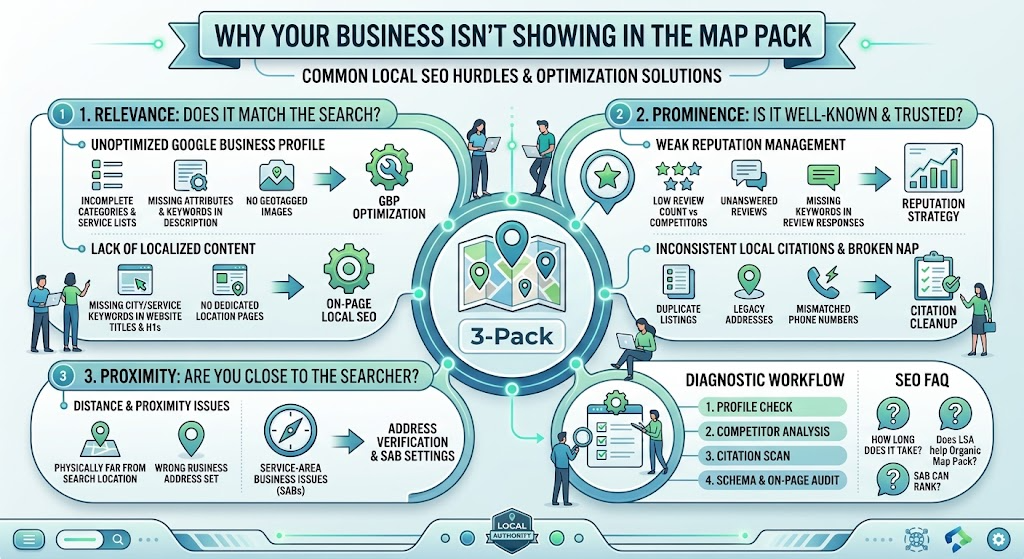
If you've been asking why your business isn't showing in the map pack, the answer almost always comes back to three things Google says it uses to rank local results: relevance, distance and prominence. (For the full picture, read how Google actually ranks local businesses in 2026.) When you're missing from the 3-Pack, one of those pillars is broken, and sometimes all three are. This guide walks through each one, the most common reasons businesses fall out of the Map Pack, and a step-by-step diagnostic you can run yourself.
The Core Anatomy of the Local 3-Pack Algorithm
Google publishes very little about how its ranking systems work, but for local results it has been unusually clear. Its own help documentation says local results are based mainly on relevance, distance and prominence. Every tactic in local SEO ties back to one of these three.
1. Relevance: does your profile match the search?
Relevance is how well your business matches what someone searched for. Google reads your primary and secondary categories, your business name, your services and products, your description, your reviews and your website to decide whether you're a good answer for a query like "water heater repair" or "emergency vet."
If Google doesn't clearly understand what you do, it won't show you, no matter how close or well known you are. Relevance problems are the most common reason a legitimate, established business is invisible for its most important searches.
2. Distance (proximity): how close are you?
Distance is how far your business is from the person searching, or from the location named in the search. If someone searches "roofer in Hackensack," Google measures distance from Hackensack. If they just search "roofer" on their phone, Google uses their current location.
Distance is the one pillar you can't really optimize. You can't move your office closer to every customer. What you *can* do is make sure Google has your correct location or service area, and build enough relevance and prominence that you win searches a little further from your front door.
3. Prominence: how well known and trusted are you?
Prominence is how well known and trusted your business is, both online and offline. Google looks at review count and rating, how often your business is mentioned on other sites, links to your website, articles and directory listings, and your overall presence on the web.
Prominence is why a business with 400 reviews, consistent listings everywhere and local news coverage can outrank a closer competitor with 12 reviews and a half-finished profile.
| Pillar | What Google asks | What you control |
|---|---|---|
| Relevance | Does this business match the search? | Categories, services, description, website content, review text |
| Distance | How close is it to the searcher or named location? | Accurate address or service area; strength in the other two pillars |
| Prominence | How trusted and well known is it? | Reviews, citations, links, local mentions, overall web presence |
Reason #1: Your Google Business Profile Optimization Is Incomplete or Misconfigured
Your Google Business Profile (GBP) is the listing that actually appears in the Map Pack. If it's incomplete, miscategorized or in trouble with Google, nothing else you do will fully make up for it. That's why Google Business Profile Optimization is the first place to look.
Incorrect or missing primary category
Your primary category is the single biggest relevance signal on your profile. It tells Google, in one line, what kind of business you are. Pick the wrong one and you can be invisible for your most valuable searches.
- A family law firm listed under "Lawyer" instead of "Family law attorney" competes against every lawyer in town instead of ranking for divorce and custody searches.
- An HVAC company listed as "Contractor" loses to competitors listed as "HVAC contractor" or "Air conditioning repair service."
- A med spa listed as "Beauty salon" may never appear for "Botox near me."
Choose the most specific category that describes your core business, the thing most of your revenue comes from, not the category you *wish* you ranked for. Look at which primary category the top three businesses in your area use for your main search. That's often the clearest hint.
Unoptimized secondary categories, services and products
Secondary categories let you show up for related work. A plumber might add "Water heater installation service" and "Drainage service." Add the ones that truly apply, and skip the ones that don't. Stuffing in loosely related categories can dilute relevance rather than help it.
Then fill out your services and products sections. Each service should have a clear name and, where possible, a short plain-language description. These sections give Google more text to connect your profile to specific searches, and they give customers a reason to call you instead of the next listing.
Incomplete attributes, hours, description and photos
A half-finished profile tells Google (and customers) that the business may not be active. Check each of these:
- Attributes such as "Wheelchair accessible," "Women-owned," "Online estimates" or "Onsite services" are filled in wherever they apply.
- Hours are accurate, including holiday hours. A profile showing "Closed" when you're open loses clicks.
- Business description explains what you do, who you serve and where, in plain language, without keyword stuffing or links.
- Photos are real, recent and show your team, work, vehicles, storefront and signage. Add new ones regularly.
- Opening date, phone number and website are all correct and match your website exactly.
Suspension triggers, unverified profiles and policy violations
Sometimes the reason your business isn't showing in the map pack is simple: Google isn't showing the profile at all. An unverified, suspended or restricted profile won't rank. Common causes:
- Keyword stuffing the business name, such as "Joe's Plumbing Best Cheap Plumber Bergen County." Your GBP name must match your real-world name on signage and documents.
- Ineligible addresses, like P.O. boxes, mail drops or virtual offices.
- Showing a home address when you actually serve customers at their location. Service-area businesses should hide their address.
- Several major edits at once, such as changing name, address and category in one session.
- Duplicate listings for the same business at the same location.
If your profile has been suspended, don't create a new one. Work through the reinstatement process first. Our guide to Google Business Profile suspension recovery walks through it step by step.
Reason #2: Weak Reputation Management Signals
Reviews are one of the clearest prominence signals Google has, and they're the first thing customers look at when comparing the three businesses in the pack. Weak review signals hurt you twice: they lower your ranking and they lower the chance someone calls you when you do show up. Good Reputation Management addresses both.
Low total review count compared to competitors
There is no magic number of reviews. What matters is how you compare with the businesses you're trying to beat. If the top three plumbers in your town each have 150 to 300 reviews and you have 18, that gap is part of the answer.
Search your main keyword from a location near your business and write down the review count and rating for each business in the top three. That's your real benchmark.
Poor review velocity and no recent feedback
Review velocity is how steadily new reviews come in. A business that received 80 reviews three years ago and none since looks less active than one earning four or five a month. Customers notice it too: a most-recent review from 2023 raises questions.
Aim for a steady flow instead of bursts. Twenty reviews in one week followed by six months of silence looks unnatural and doesn't build the recency signal you want.
Missing service keywords in reviews and responses
When a customer writes "They replaced our water heater in Teaneck the same day," that review adds relevance for water heater work in Teaneck. You can't write reviews for customers, and you shouldn't tell them what to say. But you can make it easy for them to be specific. Ask about the job itself: "If you have a minute, we'd love to hear how the water heater install went."
Your replies help too. Mention the service naturally when you respond: "Thanks, Maria. Glad the new water heater is working well." Keep it human. Replies stuffed with city names and keywords read like spam.
Unanswered negative reviews and slow responses
A negative review isn't the end of the world. An unanswered negative review is worse, because it signals to every future customer that no one is listening. Respond to every review, positive or negative, ideally within a day or two.
- Stay calm and professional. Future customers are reading your reply, not just the reviewer.
- Acknowledge the issue without arguing about details in public.
- Offer a direct way to resolve it offline, with a name and a phone number or email.
- Never share private customer information in a reply.
- Flag reviews that clearly break Google's policies (spam, conflicts of interest, off-topic rants) through your profile, but don't expect every bad review to be removed.
Actionable strategy: a compliant review flywheel
The businesses that dominate the Map Pack almost always have a simple, repeatable system for asking every happy customer for a review. Here's a version that stays inside Google's rules:
- Get your review link. Copy the "Ask for reviews" short link from your Google Business Profile.
- Ask every customer, not just the happy ones. Google's policies prohibit "review gating," which means only sending review requests to customers you expect will leave positive feedback.
- Ask at the right moment. Send the request by text or email within a few hours of finishing the job, while the experience is fresh.
- Make it one tap. Put the link directly in the message. Every extra step loses people.
- Never offer incentives. Discounts, gift cards or entries into a drawing in exchange for reviews violate Google's policies and can get reviews removed or your profile restricted.
- Respond to every review within a day or two.
- Track your numbers monthly against your top three competitors.
Reason #3: Inconsistent Local SEO Citations and Broken NAP Data
A citation is any online mention of your business name, address and phone number, such as a Yelp listing, an Apple Maps entry, a Chamber of Commerce directory or an industry site. Google uses these mentions to confirm that your business is real and that its details are accurate. That's why Local Citation Management is still one of the core local SEO ranking factors.
What NAP consistency actually means
NAP stands for Name, Address, Phone number. NAP consistency means those three details appear the same way everywhere your business is listed: your GBP, your website, directories, social profiles and data aggregators.
Small formatting differences like "Suite 4" versus "Ste. 4" usually aren't a problem on their own. The real damage comes from genuine conflicts:
- An old address from before you moved still listed on dozens of sites.
- A former phone number or a call-tracking number used as your main listed number.
- A previous business name from before a rebrand.
- Listings that show a different business name format, like "Smith & Sons HVAC LLC" in some places and "Smith HVAC" in others.
How duplicates and outdated data erode Google's trust
When Google finds two versions of your business with different addresses or phone numbers, it has to guess which one is right. Sometimes it guesses wrong. Duplicate listings can split your reviews, confuse customers and, in some cases, cause Google to filter one of the listings out of the results entirely.
Legacy data is sneaky because it spreads. An old address submitted to a data aggregator years ago can keep feeding into apps, GPS systems and directories long after you've moved.
Tier 1 aggregators vs. niche industry directories
Not all citations carry the same weight. Think of them in tiers:
| Type | Examples | Why it matters |
|---|---|---|
| Core platforms | Google Business Profile, Apple Business Connect, Bing Places, Facebook, Yelp | Directly power maps, voice assistants and major search results |
| Data aggregators | Data Axle, Neustar Localeze, Foursquare | Feed business data to hundreds of apps, GPS systems and smaller directories |
| Industry directories | Healthgrades, Avvo, Angi, Houzz and trade association listings | Strong relevance signals for your specific field |
| Local sources | Chamber of Commerce, town business directories, local news sites | Reinforce that you're part of the local community |
Fix the core platforms and aggregators first. Correcting data at the source stops bad information from spreading back into smaller directories.
Actionable strategy: a step-by-step citation audit
- Pick your official NAP. Write down the exact name, address and phone number format you'll use everywhere, matching your GBP and your website.
- Search for old data. Google your business name with each old address and old phone number you've ever used. Note every listing that comes up.
- Check the core platforms (Apple, Bing, Facebook, Yelp) and the major aggregators.
- Find and fix duplicates. Claim duplicate listings where possible, then merge or remove them following each platform's process.
- Update, don't just add. Correcting 20 wrong listings usually does more than creating 50 new ones.
- Add relevant industry and local listings once the basics are clean.
- Recheck quarterly and after any move, rebrand or phone change.
Reason #4: On-Page and Technical Local SEO Disconnects
Your website is where Google goes to confirm what your profile says. If the two tell different stories, or if the site gives Google very little to work with, your Map Pack rankings suffer.
Missing LocalBusiness schema markup
Schema markup is structured code (usually JSON-LD) that tells search engines exactly who you are: your business type, name, address, phone, hours and service area. It doesn't guarantee a ranking boost, but it removes guesswork and helps Google connect your website to your Business Profile.
Use the most specific type that fits, such as Plumber, Dentist or HVACBusiness, and make sure every detail matches your GBP exactly.
Poor localized content
Many local business websites never actually say where they work or what they do in plain terms. Check your homepage and main service pages:
- The title tag includes your main service and city, like "Emergency Plumber in Hackensack, NJ | Smith Plumbing."
- The H1 clearly states the service and area.
- The page content describes the specific services you offer and the towns you serve.
- Your NAP appears in the footer or on the contact page, matching your GBP exactly.
- The website linked from your GBP is the page that best matches your main category, often the homepage or a location page.
No dedicated location or service-area pages
If you have several locations, each one needs its own page with its own address, phone number, hours, map and genuinely unique content, and each GBP should link to its matching page.
Service-area businesses can use town pages too, but only if each page offers something real: local details, projects in that area, specific services and answers to local questions. Dozens of copy-paste pages with only the town name swapped add little value and can hurt your site's quality overall.
Weak local authority and backlinks
Links from other websites are still a strong prominence signal. For local businesses, the most useful links usually come from real community involvement rather than outreach campaigns:
- Chamber of Commerce and business association memberships
- Sponsoring local youth sports, charity events or school programs
- Being quoted or featured in local news
- Supplier, manufacturer or certification directories
- Partnerships with complementary local businesses
A handful of genuine local links often does more for local authority building than hundreds of generic directory links.
Step-by-Step Diagnostic Framework: How to Troubleshoot Your Map Pack Drop
If you're still not sure why your business isn't showing in the map pack, work through these five steps in order. Each one rules out a pillar before you move to the next.
Step 1: Check profile status and primary category
- Open your profile while signed in. Is it verified? Is there a suspension or restriction notice?
- Search your exact business name in an incognito window. Does your profile appear at all?
- Is your primary category the most specific match for your main service? Does it match what the top three competitors use?
- Does your business name match your real-world signage, with no extra keywords?
Step 2: Audit geo-proximity and the searcher's location
Rankings change depending on where the search happens. Searching from your office will almost always make you look better than you really are. Check how you rank from several points around your service area, such as the neighboring towns where you want customers.
Grid-based rank tracking tools show this visually by checking your ranking at many points on a map. If you rank well within a mile of your address but vanish two miles away, the issue is usually prominence and relevance, not a penalty.
Step 3: Compare review velocity against the top 3
| What to compare | You | Competitor A | Competitor B | Competitor C |
|---|---|---|---|---|
| Total reviews | ||||
| Average rating | ||||
| Reviews in the last 90 days | ||||
| Owner responds to reviews? |
Fill this in for your main search. If you're behind on count or recent reviews, your review flywheel is the priority.
Step 4: Run a citation consistency scan
Search your business name, each old address and each old phone number. Check the core platforms and aggregators. Note duplicates, wrong details and old business names, then fix them starting with the most important sources.
Step 5: Verify schema and on-page local signals
- Your NAP on the website matches your GBP exactly.
- LocalBusiness schema is present and passes Google's Rich Results Test and the Schema.org validator.
- Title tags and H1s name your main service and area.
- The page linked from your GBP is the most relevant page for your main category.
- Each location has its own page, and each GBP links to the right one.
Adding FAQPage Schema to Your Own FAQ Section
If your website has a frequently asked questions section, you can mark it up with FAQPage schema so search engines clearly understand each question and answer. Google now shows FAQ rich results only for a limited set of authoritative sites, but the markup still helps search engines and AI tools read your answers accurately.
- Put the questions and answers visibly on the page. Schema must match what visitors can actually see, word for word.
- Add a JSON-LD script like the example below to the same page, with one entry per question.
- Test it with Google's Rich Results Test and fix any errors.
- Update the schema whenever you change the visible questions or answers.
<script type="application/ld+json">
{
  "@context": "https://schema.org",
  "@type": "FAQPage",
  "mainEntity": [
    {
      "@type": "Question",
      "name": "How long does it take to show up in the Google Map Pack?",
      "acceptedAnswer": {
        "@type": "Answer",
        "text": "Most businesses see changes within a few weeks to a few months, depending on competition and how much needs fixing."
      }
    }
  ]
}
</script>
Conclusion: The Map Pack Is a System, Not a One-Time Task
Getting into the Local 3-Pack isn't about a single trick. It's about giving Google clear, consistent proof that your business is relevant to the search, close enough to the searcher and prominent enough to trust. When you drop out, one of those pillars needs attention.
The businesses that stay in the Map Pack treat it like any other part of running the business: they keep their profile complete, ask every customer for a review, keep their listings accurate and make sure their website backs up everything their profile says.
Start today:
- Audit your profile. Confirm verification, fix your primary category and fill in every section.
- Standardize your citations. Pick one official NAP and correct it everywhere, starting with the core platforms.
- Build a review engine. Ask every customer, every time, and respond to every review.
If you'd rather have someone run the diagnosis for you, request a free Google Business Profile audit and we'll show you exactly which pillar is holding you back.
Author Bio
Dan Powers is the Founder & CEO of Pwr Up Digital, a local SEO service helping service businesses across New Jersey get found by the people already searching for what they do. He spent over two decades in SEO, including as VP of Product at TMP Worldwide, before starting Pwr Up Digital in 2022. Dan personally handles strategy calls for every client — book a free audit here.