

November 5, 2026 · 8 min read
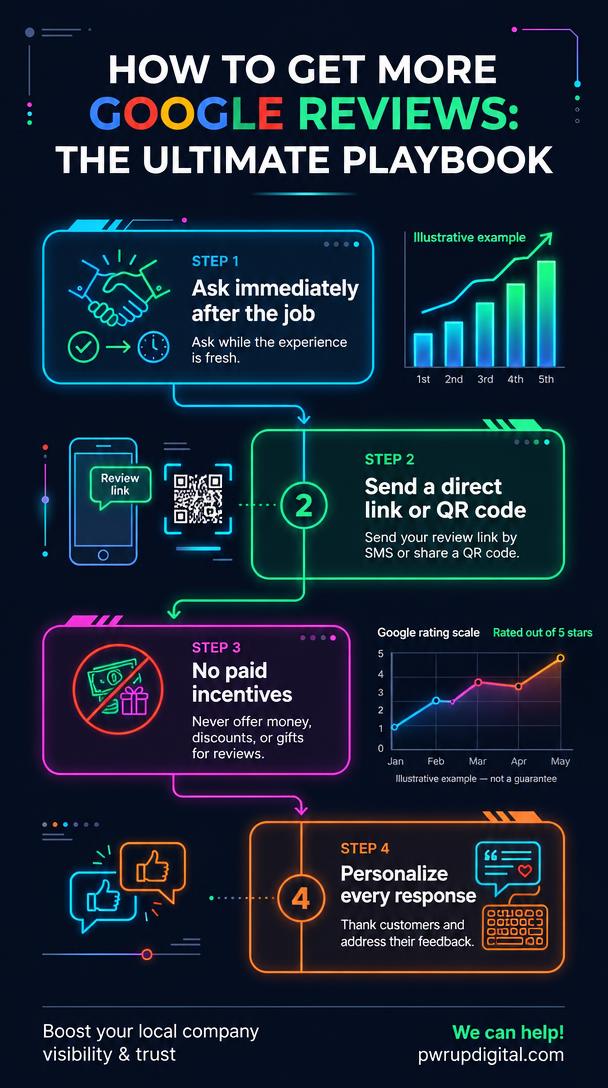
The best way to get more Google reviews is to build a simple, repeatable ask into every job you already finish, then make it easy for the customer to say yes with a direct link or QR code.
There is no legal shortcut. Google prohibits offering incentives for reviews, and no single review fixes a rating overnight. Steady, honest volume from real customers is what moves the needle.
How do I ask customers for Google reviews without being pushy?
Ask at the natural high point of the job, right after the work is done and the customer is happy, not weeks later in a mass email. A customer who just watched a technician clean up properly and explain the repair is far more likely to leave a review than someone sorting through an inbox days later.
Keep the ask short and specific. Tell the customer where to go and what to write about, such as the technician, the turnaround time, or the cleanup. A vague request for a review produces vague reviews. A specific prompt produces useful details that future customers actually read.
Give one clear path. Google advises businesses to remind customers to leave reviews by asking them to visit a Google link or scan a QR code, according to Google Business Profile Help. Do not make the customer search for your listing or figure out the process on their own.
Make the ask a habit, not a campaign. The same ask should come from the office staff or the tech who was on site, every single job. A business that asks ten times a week will outperform a business that asks two hundred times in one month and then stops.
What's the fastest way to make leaving a review easy for my customers?
Send the direct review link by text or email while you are still at the job site. The customer is standing there with their phone in hand. Do not make them search for your listing, scroll through Maps, or remember to do it later. The moment of completion is the moment of highest willingness.
Print a QR code on the invoice, the truck, or a counter card so the path is one scan. Google specifically recommends a Google link or QR code as the reminder method, according to Google Business Profile Help. One scan should land the customer directly on the review form.
Remember that customers need a Google Account to leave a review, and a non-Gmail email address works fine. A customer with a Yahoo, Outlook, or work email can set up a Google Account using that address, per Google Business Profile Help.
Keep your Business Profile claimed and accurate so the review button is easy to find on Search and Maps. A free Business Profile lets businesses personalize their profile, manage customer reviews, and appear on Google Search and Maps, according to Google Business Profile. If your hours, address, or phone number are wrong, customers lose trust before they ever write a word.
Can I offer discounts or gift cards in exchange for Google reviews?
No. Offering free or discounted goods or services in exchange for posting, changing, or removing reviews is treated as fake and misleading content and is strictly prohibited, according to Google Business Profile Help. This is not a gray area.
Say this plainly to your team. Well-meaning staff handing out gift cards or promising a discount for a five-star review can put the whole profile at risk. One incentivized review can trigger removal, and a pattern of incentivized reviews can damage visibility or lead to profile restrictions.
How many 5-star reviews do I need to raise my Google rating?
It depends on how many reviews you already have. A Google rating is an average, so the effect of one new review shrinks as the total count grows. A business with 12 reviews moves fast. A business with 400 reviews barely budges from a single five-star rating.
A business with 12 reviews and a 4.2 average needs roughly a handful of five-star reviews to see visible movement. A business with 400 reviews and the same average may need dozens of new five-star reviews before the displayed rating changes by a tenth of a point.
Steady volume beats one-time pushes. Consistent reviews month after month protect the rating over time and signal that the business is active. A burst of reviews followed by silence looks less natural and does less for long-term visibility.
Be honest that no one can promise a specific rating outcome. Google does not publish its exact formula, and review removal, filtering, and account behavior all affect the final number. Any agency that guarantees a rating increase is guessing.
How should I respond to Google reviews—good and bad?
Reply to reviews in a timely manner. Google states this directly, according to Google Business Profile Help. A quick reply shows the reviewer, and everyone reading later, that the business pays attention.
Keep replies short and simple. People may stop reading long replies before reaching the main point. Two or three sentences are usually enough: acknowledge the feedback, address any specific issue, and move on.
Do not paste the same thank-you on every review. Google advises against sending the same response to everyone. Personalize with the reviewer's name and their specific feedback.
Treat negative reviews as information, not a crisis. Google notes that negative reviews are not necessarily a sign of poor business practices and can help you understand customer expectations. A calm, specific reply often impresses future customers more than a wall of five-star ratings.
If a review appears to violate Google's content policies, flag it rather than argue in the replies. Arguing in public rarely changes the review and often makes the business look defensive.
What should I do with the rest of my Google Business Profile to support reviews?
A free Business Profile lets you add photos, respond to reviews, and highlight five-star ratings, according to Google Business Profile. Use all of it. A complete profile with real photos and active responses reads as trustworthy before a customer ever decides to leave a review.
- Keep hours, address, phone, and services current. A wrong address or dead number can turn into a negative review that had nothing to do with the actual service.
- Use posts for offers, events, and updates to keep the profile active between reviews.
- Turn on online booking if it fits your business. Removing friction for customers who found you on Search or Maps improves the overall experience.
- Add real photos of your team, trucks, and finished work.
How does Pwr Up Digital handle Google reviews for New Jersey service businesses?
Pwr Up Digital treats Reputation Management as the ongoing process of monitoring, shaping, and influencing how a local business is perceived across online reviews, local listings, search results, and customer conversations. The work is not a one-time cleanup. It is a standing system for keeping the business's reputation accurate and current.
We monitor feedback across Google, Yelp, and social media and respond to positive and negative reviews professionally. The process includes earning new reviews from satisfied customers, catching service issues early before they become public backlash, and keeping local directory listings, addresses, hours, and contact details up to date.
The service fits brick-and-mortar stores, service-based businesses, hospitality and food service, professional practices, and multi-location regional brands. Plumbers, electricians, roofers, HVAC companies, contractors, dentists, and lawyers in New Jersey fit squarely into that description.
The division of responsibility is straightforward. Pwr Up Digital handles the monitoring, response drafting, review generation systems, and listing accuracy. The owner or manager provides the real-world context: what happened on a job, how a complaint was resolved, and what the business wants to emphasize. The goal is a reputation that reflects the actual work, not a manufactured image.
What mistakes get Google reviews removed—or get my profile in trouble?
Incentivized reviews are the big one. Paying, discounting, or gifting in exchange for reviews is prohibited, according to Google Business Profile Help. The penalty can include review removal, profile restrictions, or loss of visibility.
Do not script reviews or write them for customers. A review that sounds like it was written by the business owner reads as fake to customers and can trigger Google's automated filters. Authentic wording, even with imperfect grammar, performs better.
Do not buy reviews or trade them with other businesses. Google's systems are designed to detect patterns of fake reviews, and the damage from a removal wave often outweighs any short-term gain.
If a review is removed and you believe it was a mistake, use Google's flagging process rather than starting over. A new profile means losing your existing review history and any local ranking progress.
Key takeaways
- The best way to get more Google reviews is a consistent, low-pressure ask at the end of every job, paired with a direct link or QR code.
- Google prohibits offering free or discounted goods or services in exchange for posting, changing, or removing reviews.
- Customers need a Google Account to leave a review, but a non-Gmail email address works.
- Reply to reviews promptly, keep replies short, and personalize them by name and specific feedback.
- A mix of positive and negative reviews often reads as more trustworthy than a wall of five-star ratings.
- How much one new five-star review moves your rating depends on how many reviews you already have.
Want help building a review system that runs every week? .
Author Bio
Dan Powers is a veteran product leader with extensive experience scaling digital solutions from the ground up to the global enterprise level. Formerly the Head of Product at TMP Worldwide, he led the teams responsible for building platforms for some of the world’s largest brands, including Amazon, Walmart, and UPS. Having successfully navigated both the complex demands of the Fortune 500 and the high-growth environment of startups, Dan writes on local SEO strategy for Local Service Businesses with a focus on his career-long hallmarks: collaboration and transparency.